Open an encounter
Wait for the map to load and tap a Pokémon that appears nearby. On the encounter screen, check your ball supply before throwing. Stand still while practising so your aim is easier to repeat. If you use the normal non-AR view, you can focus on the throw without framing the real-world scene.
Aim at the Pokémon
Touch and hold the ball to observe the shrinking target ring, then swipe upward toward the Pokémon. Adjust the direction and distance of the swipe after each miss. A smaller ring can reward a more accurate throw, but beginners should first aim to hit the target reliably.
Use items deliberately
Open the ball or Berry selection when you need a different option. Great Balls and Ultra Balls can improve your chance, while different Berries serve different purposes; read the item description. Do not spend your entire supply testing one difficult encounter. A useful first goal is several controlled throws in a row.
Confirm the catch
Wait for the result rather than closing the game immediately after a hit. A breakout means another attempt may be needed; a flee ends that encounter. After success, inspect the Pokémon in storage. Save valuable catches before clearing duplicates, and practise curveballs later using the separate throwing guide.
Read the encounter screen before the next throw
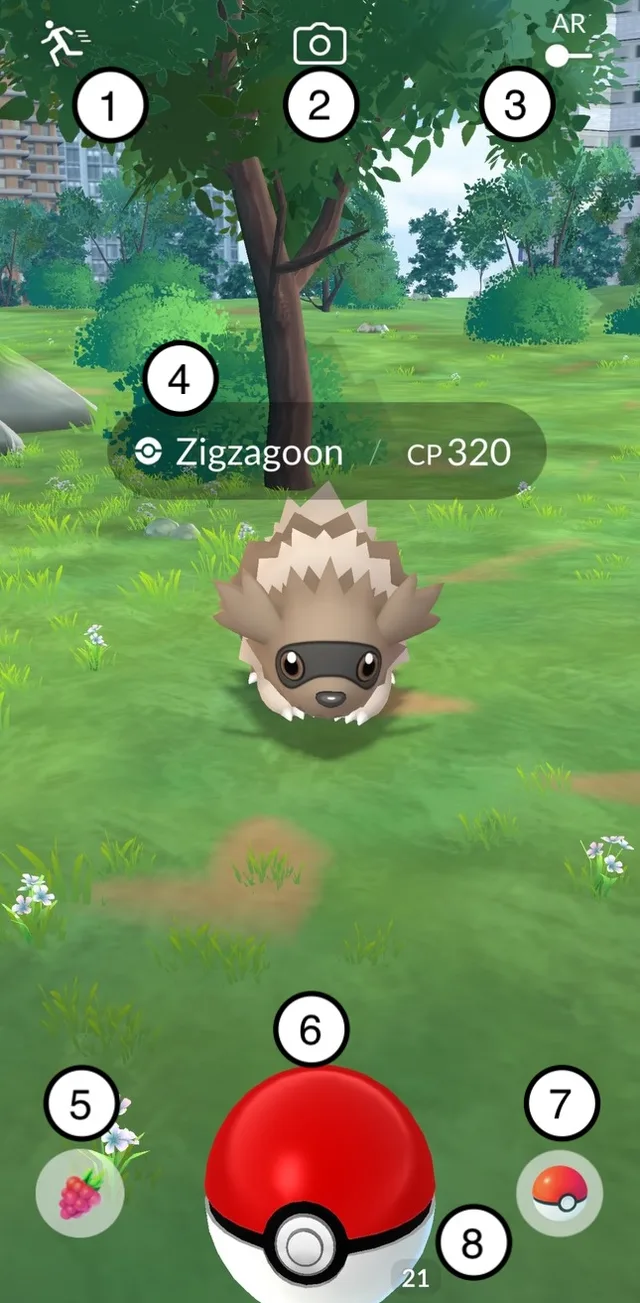
In the numbered official screenshot, 5 opens Berries, 6 is the ball you throw, 7 changes the ball type and 8 shows the remaining count of the selected ball. These controls solve different problems: choose a ball or Berry before throwing instead of searching for them while a throw is in motion.
Watch what happened after the throw. Missing the Pokémon, hitting it without a catch and seeing it flee are different outcomes. If it remains on screen, you can try again with the supplies shown. After a successful catch, confirm the Pokémon in your collection before transferring anything.
Sources & further reading
Game details can change. Check the linked official sources and the current in-game information. Reviewed: Oct 5, 2026.