Find the Add Friend screen
Tap your portrait, open Friends and choose Add Friend. Your own Trainer Code is available there, alongside the option to enter someone else’s code. Confirm which code you are sharing. A referral code and a Battle Code have different purposes, even though all three can appear in conversations about playing together.
Send a request
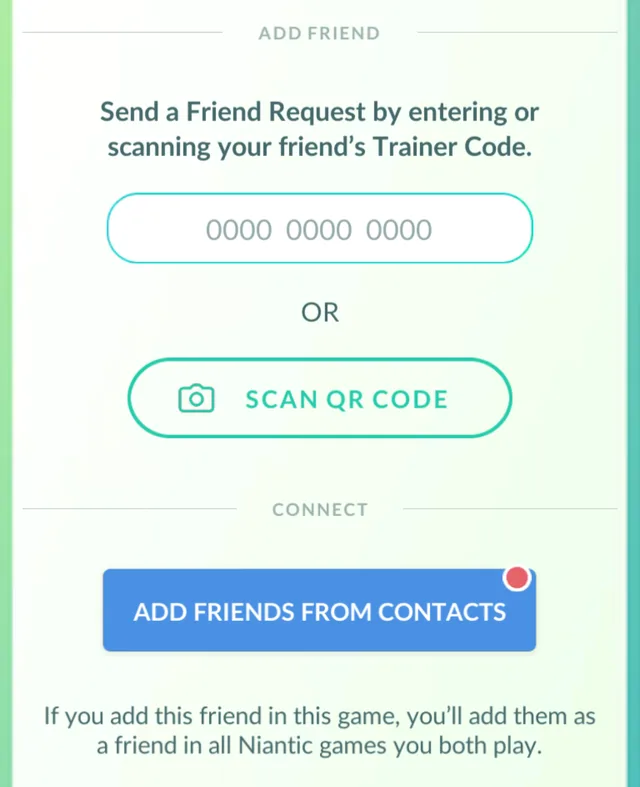
Enter the other Trainer’s 12-digit code carefully or use the QR option to scan their Add Friend code. Check the resulting profile before sending. If you are meeting in person, scanning can avoid a mistyped digit. The other player still needs to review and accept the request; sending it does not immediately complete the connection.
If the request does not work
Ask for the current code and check whether either player has reached a friend-list limit. A code can be reset, so a saved image may become outdated. Pending requests also expire. If the feature is restricted on a child account, use the official parental controls rather than trying to bypass the account’s age settings.
Share only what is needed
A Trainer Code is enough for a normal request; you do not need to share a sign-in email or password. Think about where you post your code and which requests you accept. Once connected, use a recognisable nickname for the friend if helpful, then coordinate gifts or battles in a way both of you enjoy.
Trainer Code, QR code or raid invitation?
The Add Friend screenshot shows two routes to the same request: type the Trainer Code, or scan the friend’s QR code. Copying a code does not accept the request for the other person. Ask them to check their incoming requests and confirm that the displayed Trainer is you.
A friendship request is separate from a raid invitation. If the purpose is to raid together, finish adding each other first, then agree on the raid and invitation timing. If a code fails, ask for the current code rather than guessing digits or sharing your login details.
Sources & further reading
Game details can change. Check the linked official sources and the current in-game information. Reviewed: Oct 5, 2026.